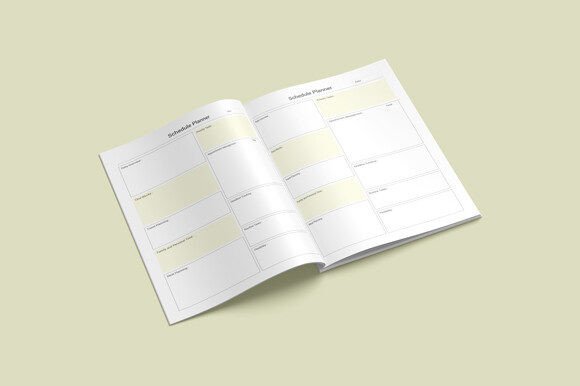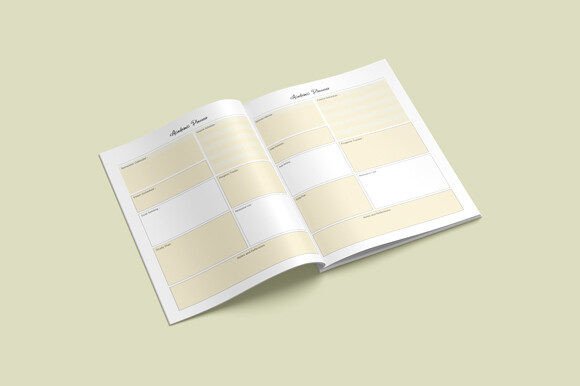
Academic Planner KDP Printable Notebook
Whether you’re mapping out your first semester as a college student, launching a side hustle selling planners on Amazon KDP, or designing custom academic tools for your tutoring business—the Academic Planner KDP Printable Notebook meets you where you are. It’s not just another PDF download. It’s a thoughtfully built, production-ready interior file designed for real-world use—by students, creators, educators, and small business owners alike.
What exactly is this planner—and why does the format matter?
This isn’t a physical notebook you order and wait for. It’s a digital download: a complete 109-page interior file optimized for Amazon KDP publishing, local printing, or personal editing. You get editable source files in Adobe Illustrator (.ai), plus versatile formats—PDF (print-ready), JPG, PNG, and even PPTX—for flexibility across platforms and workflows.
The layout is clean, functional, and intentionally sized at 8.5 x 11 inches—a standard that fits most home printers, office copiers, and KDP’s paperback requirements. There’s no bleed, which eliminates guesswork when trimming or aligning margins. And because it’s built at 300 ppi, every line, grid, and header prints crisply—no fuzzy text or pixelated icons.
Students & lifelong learners
For a graduate student juggling research deadlines, teaching assistant duties, and thesis chapters, this planner offers structure without rigidity. The 109 pages include weekly spreads, goal trackers, reading logs, and reflection prompts—all in one consistent layout. Since it’s printable, they can print only what they need—say, eight weeks of class planning—then add hand-drawn notes or highlight key dates. No app subscriptions. No syncing issues. Just quiet, focused time with paper.
Educators & academic coaches
A high school AP Biology teacher might adapt the “Course Progress Tracker” page to map lab experiments across quarters—or repurpose the “Concept Review Log” for student self-assessment. Because the Illustrator file is fully editable, she can swap in her school’s logo, adjust font sizes for readability, or translate headers into Spanish for bilingual learners. That level of control matters when supporting diverse classrooms—not just aesthetics, but accessibility and alignment with curriculum goals.
KDP creators & indie publishers
If you’re building a catalog of niche planners—“STEM Study Planner,” “Grad School Success Journal,” or “Homeschool Academic Tracker”—this interior serves as a proven, KDP-compliant foundation. You don’t start from zero. You import the .ai file, tweak colors and branding, write your own intro page, and upload the final PDF. The 109-page count hits KDP’s sweet spot for mid-length notebooks (not too thin, not overly padded). And since it’s already formatted to KDP specs—correct margins, no bleed, CMYK-safe grayscale—you avoid common rejection triggers.
Freelancers & small business owners
A freelance academic editor uses the “Client Project Timeline” spread to track manuscript revisions, feedback rounds, and delivery windows. She prints two copies: one for quick annotations during client calls, another scanned and filed digitally. Because the PDF is print-optimized, her home laser printer renders crisp lines—even after dozens of copies. For her, reliability isn’t abstract—it’s knowing page 47 won’t ghost or blur when she’s racing to meet a deadline.
What priorities shape how you’ll experience it?
Your needs determine what stands out.
- Ease of use: Beginners appreciate the ready-to-print PDF. No design software needed. Just download, open, and print—or upload straight to KDP.
- Flexibility: Design-savvy users lean into the .ai file. They change fonts, reorder sections, or insert custom icons—turning a template into something unmistakably theirs.
- Quality: Printers and resellers care about resolution and color fidelity. At 300 ppi and built for CMYK output, this interior avoids muddy grays or washed-out headers—critical when ordering bulk runs locally.
- Commercial value: For KDP sellers, time saved equals margin earned. Reusing a compliant interior means faster launches, fewer formatting revisions, and more energy spent on marketing—not troubleshooting gutter width.
- Long-term usefulness: Unlike apps that sunset or require updates, this stays usable for years. Store the files on your drive, print new copies anytime, annotate freely, and keep your system stable—even as your goals evolve.
Practical examples—beyond the obvious
A PhD candidate in linguistics uses the “Research Milestone Tracker” to log fieldwork hours, transcription progress, and advisor feedback dates—then exports a cleaned-up version as a progress report for her committee.
A homeschool parent adapts the “Weekly Learning Log” into a dual-column sheet: left side for math concepts covered, right side for hands-on activities tried. She prints it weekly, checks off items with her child, and files each page in a binder for end-of-year portfolio reviews.
A micro-press owner licenses the interior for non-exclusive use, adds original cover art and a short introduction on study strategies, and sells printed versions at local university bookstores—no inventory risk, just on-demand printing as orders come in.
Does it fit your situation?
Ask yourself:
- Do you need a planner that works offline, without login screens or cloud sync? → This delivers.
- Are you publishing on KDP and want to avoid layout rejections? → Its specs match KDP’s current guidelines.
- Do you prefer editing in Illustrator—or would a simple PDF suffice? → You get both.
- Is print quality non-negotiable for client-facing or resale use? → 300 ppi ensures sharpness, even on matte paper.
- Do you value consistency across semesters or projects? → One interior, reused meaningfully year after year.
It won’t replace specialized tools like Notion for complex databases—or Miro for collaborative whiteboarding. But where clarity, portability, and intentionality matter, it holds space. Quietly. Reliably. Without fanfare.
Whether you’re sketching lecture notes in the library, prepping a KDP launch at midnight, or helping a teen organize their first AP course load—this planner supports the work, not the noise around it.