Dot Markers Activity Book Fruits - KDP
If you're launching or expanding your KDP catalog with early-learning resources, the Dot Markers Activity Book Fruits - KDP is a smart, time-saving foundation. It’s not just another coloring book—it’s a thoughtfully structured, developmentally appropriate tool designed for children aged 1 to 5, built from the ground up for both learning impact and publishing efficiency.
What Makes This Activity Book Different?
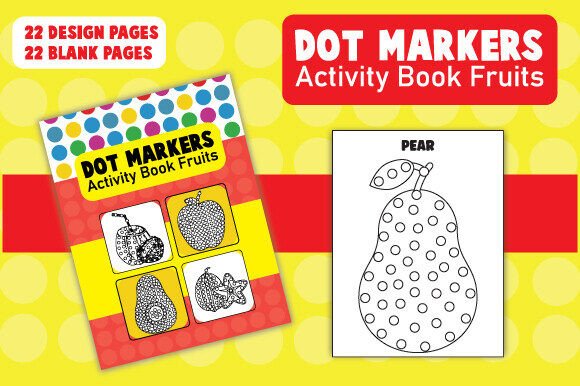
At its core, this package delivers 45 ready-to-use interior pages: 22 vibrant, food-themed dot marker designs (think apples, bananas, strawberries, watermelons, and more) paired with 22 clean blank pages. That balance is intentional—structured practice meets open-ended creativity. Each fruit-themed page encourages hand-eye coordination, pincer grip development, color recognition, and early counting—all through playful, low-pressure mark-making.
Unlike static PDFs or rigid templates, every element is editable. You get Illustrator (.ai) files for both cover and interior—so you can adjust colors, swap fonts, add your logo, localize text, or even retheme pages (e.g., turn “orange” into “orange slice” or adapt for seasonal variations). You also receive high-res JPG and print-ready PDF versions, making it easy to upload directly to KDP without design delays.
Why Educators, Parents, and Creators Choose This Format
For educators and homeschooling caregivers, dot marker activities are proven supports for fine motor development—especially for toddlers just beginning to hold tools intentionally. A child pressing a dot marker onto an apple outline isn’t just “playing”; they’re building neural pathways for writing readiness. The fruit theme adds gentle vocabulary exposure and real-world connection—great for speech therapy sessions or sensory-rich classroom rotations.
For creators and KDP sellers, this resource solves several common pain points: designing age-appropriate layouts from scratch, sourcing royalty-free food illustrations that align with developmental goals, and ensuring KDP-compliant bleed, margins, and resolution. With this package, you skip months of trial-and-error and start with a polished, market-tested structure.
Real-World Uses Beyond the Bookshelf
Think beyond “just a printable.” Many buyers use this file set in flexible ways:
- Classroom centers: Print individual pages on cardstock, laminate them, and pair with washable dot markers for reusable station activities.
- Therapy tools: Occupational therapists modify pages to target specific grip patterns or visual tracking—changing dot size, spacing, or background contrast using the editable AI files.
- Brand-aligned bundles: Add your own branding, include matching flashcards or parent tips as bonus content, or combine with other themed books (e.g., vegetables, farm animals) to build a cohesive series.
- Subscription boxes: License the interior for physical kits—print on eco-friendly paper, pair with biodegradable markers, and offer monthly fruit-themed learning packs.
Getting Started Is Simpler Than You Think
You don’t need advanced design skills to begin. If you’ve used Canva or basic desktop publishing tools, you’ll find the Illustrator files intuitive—layers are named clearly, fonts are standard (or easily substituted), and layout grids follow KDP’s trim and bleed guidelines. Even if you only tweak the cover title font and upload the included PDF, you’ll have a professional-looking book live on Amazon in under an hour.
That said, a few practical considerations help ensure success:
- Know your audience’s expectations: Parents search for “toddler dot marker book,” “fine motor activities for preschoolers,” or “fruit learning for ages 2–4.” Use those phrases naturally in your KDP title and description—not as keyword stuffing, but as clear signals of relevance.
- Test print before publishing: Order a physical proof copy from KDP. Check that dot outlines are crisp at 300 DPI, colors render well on matte paper, and blank pages truly leave enough white space for little hands to explore freely.
- Consider age-specific pacing: While the book serves ages 1–5, younger kids may need larger dots or simpler shapes. You can easily scale elements in Illustrator—or create a “Level 1” version focused on single-fruit pages with extra spacing.
- Pair with value-adds: Include a one-page parent guide (in your interior PDF) explaining *why* dot marking matters—and how to extend each activity (e.g., “After dotting the banana, count the dots together. Then name three yellow things in your kitchen!”).
A Resource That Grows With Your Goals
This isn’t a one-off download—it’s a scalable asset. Once you publish your first edition, updating it is straightforward: swap out a few fruit illustrations for new ones, translate key instructions into Spanish or French, or create a companion “Fruits & First Words” version with simple labels. Because everything is editable, your book stays fresh, responsive, and aligned with emerging trends—like demand for inclusive representation or nature-based learning themes.
It also opens doors beyond Amazon. Use the same interior files to create digital downloads for Etsy or your own website, design interactive PDFs with clickable sound buttons (for virtual learning), or adapt pages into social media carousel posts showing “before and after” dot marker results—great for building educator-focused Instagram or Pinterest audiences.
Final Thought: Quality Meets Practicality
The Dot Markers Activity Book Fruits - KDP stands out because it bridges two often-competing priorities: educational integrity and publishing practicality. It doesn’t sacrifice developmental intention for speed—or flexibility for polish. Whether you’re launching your first KDP title or scaling a niche brand in early childhood resources, this package gives you a strong, adaptable, and genuinely useful starting point—one that serves kids’ growth *and* your creative or business goals.