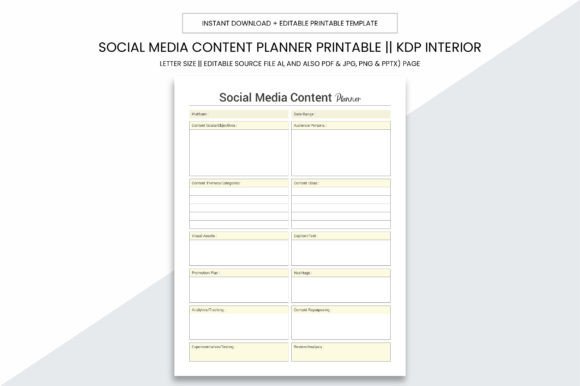
Social Media Content Planner Kdp Notes
Staying consistent, strategic, and creative across social platforms is no longer optional—it’s foundational. Whether you’re launching your first KDP book, managing a local service business, or building a personal brand as a coach or educator, content planning directly impacts visibility, engagement, and growth. The Social Media Content Planner Kdp Notes isn’t just another notebook. It’s a purpose-built system designed for real-world workflows—printed, digital, editable, and built to scale with your goals.
A Tool That Grows With Your Workflow
Today’s creators juggle multiple roles: writer, designer, scheduler, analyst, and sometimes even customer support. Tools that demand rigid adherence to one method often get abandoned. What’s gaining traction instead are flexible, tactile-digital hybrids—resources that work whether you’re sketching ideas on paper, editing in Adobe Illustrator, or uploading directly to Kindle Direct Publishing. The Social Media Content Planner Kdp Notes reflects this shift. Its 8.5 x 11 inch practical size fits standard printers and binders, while the no-bleed layout ensures clean, professional output—no guesswork, no cropped margins.
This isn’t a static PDF you print once and forget. It’s a fully layered Adobe Illustrator (Ai) source file—editable down to individual text boxes and color swatches. Need to adjust your brand palette? Swap out icons? Repurpose a monthly calendar into a client-facing proposal? You can. Alongside the Ai file, you’ll receive high-resolution PDF, JPG, PNG, and PPTX versions—each optimized for its use case. The PDFs render at 300 ppi, meeting commercial print standards so your local print shop delivers crisp, vibrant results every time.
Why 109 Pages Matters—Not Just Quantity, But Structure
Many planners offer “plenty of space”—but space without scaffolding leads to inconsistency. The 109-page interior of the Social Media Content Planner Kdp Notes is curated, not cluttered. It begins with goal-setting prompts and audience mapping worksheets—not vague affirmations, but concrete questions like “What three emotions do I want my audience to feel after reading this post?” or “Which platform delivers the highest engagement *for my niche*, not just the largest audience?”
From there, it moves into tactical layers: content buckets by theme (e.g., educational, behind-the-scenes, promotional), caption templates with character counters for Instagram, LinkedIn, and X, and hashtag research trackers that encourage intentional, not automatic, tagging. There’s a dedicated section for repurposing—turning one blog post into a carousel, a Reel script, an email newsletter, and a Pinterest pin—all mapped side-by-side so you see the connections, not just the tasks.
For KDP authors, pages include title brainstorming grids, series arc trackers, reader persona cards, and launch timeline checklists synced to Amazon’s algorithmic windows (e.g., “Upload final cover 7 days before launch to allow for processing”). For local businesses, there are seasonal campaign calendars, review-response log templates, and community engagement logs—tracking not just *what* you posted, but *who* commented, *what* they asked, and *how* you followed up.
Digital Flexibility Meets Physical Clarity
We’ve moved past the false choice between analog and digital. The most effective planners today live in both spaces—and the Social Media Content Planner Kdp Notes bridges them intentionally. Print the weekly spread, annotate it by hand during your morning review, then scan and save the updated version alongside your editable Ai file. Or use the PPTX version to build a live team briefing deck—dragging in your latest analytics screenshot next to the planned content grid.
This dual-mode design responds to how attention works now. Studies show that handwriting activates deeper cognitive processing—ideal for strategy sessions or brainstorming. Meanwhile, digital files enable rapid iteration, version control, and collaboration. The planner doesn’t force one mode over the other; it assumes you’ll shift between them, often in the same day.
Designed for Real Constraints—Time, Budget, and Bandwidth
Small business owners don’t have unlimited design budgets. Freelancers can’t justify $50/month SaaS tools for basic scheduling. Educators and hobbyists need clarity—not complexity. That’s why this planner avoids feature bloat. There are no login portals, no subscription walls, no learning curve beyond opening a file. It’s ready to use the moment you download it.
The high-quality print specs—300 ppi, CMYK-ready, bleed-free—mean you can order 10 copies from your neighborhood print shop for under $30 and have them in hand the same day. No waiting for shipping, no risk of color shifts from uncalibrated home printers. And because the PDF interior is formatted for KDP, you can upload it directly as a low-content notebook—no reformatting, no troubleshooting. This isn’t theoretical convenience. It’s tested workflow efficiency.
More Than Planning—It’s Pattern Recognition
Over time, consistent use reveals patterns most creators miss. You might notice that your highest-performing posts all share a specific question format—or that engagement drops sharply when you post after 7 p.m. in your time zone. The Social Media Content Planner Kdp Notes includes reflection prompts at the end of each month: “What post surprised you? Why?” “Which platform felt most aligned with your energy this month?” “What task took longer than expected—and what could simplify it next time?”
These aren’t journaling exercises. They’re diagnostic tools. One freelance graphic designer reported cutting her content prep time by 40% after three months—not because she worked faster, but because she stopped repeating ineffective approaches. She used the planner’s “Post Outcome Tracker” to identify that carousels with handwritten-style fonts outperformed sleek vector graphics in her niche—and adjusted accordingly.
Who Benefits Most—and How They Use It Differently
- KDP Authors: Use the “Series Launch Timeline” and “Reader Feedback Log” to align book releases with audience readiness—not just calendar dates. Track which blurbs or teasers generated pre-orders, then replicate those structures.
- Local Service Businesses: Fill out the “Community Spotlight Page” weekly—highlighting a client story, a neighborhood event, or a staff member. This builds authenticity without requiring polished photography or video.
- Educators & Coaches: Leverage the “Lesson-to-Content Bridge” worksheet: turning one workshop concept into five micro-posts, a downloadable checklist, and a 60-second audio tip—maximizing reach without creating new material.
- Freelancers: Use the “Pitch Prep Grid” to store past client briefs, successful headlines, and revision notes—so your next proposal draws from proven language, not guesswork.
Not a Shortcut—A Foundation
This planner won’t replace strategy. It won’t write your captions or choose your hashtags. What it does is remove friction from execution—so your best ideas don’t stall at the “I’ll do it later” stage. In an era where attention is fragmented and expectations for consistency are higher than ever, having a single, reliable place to capture, refine, and schedule your voice makes tangible difference.
The Social Media Content Planner Kdp Notes meets people where they are: whether you’re printing your first batch for a weekend market stall, preparing your KDP interior for upload, or redesigning your team’s content process. Its strength lies in its balance—professional enough for commercial use, adaptable enough for personal experimentation, and grounded enough to stay useful long after the latest algorithm update.
If you’ve ever lost a great idea because it wasn’t captured in the right context—or spent more time formatting a calendar than planning the content itself—this is built for you. Not as a novelty, but as infrastructure.