Dog Paw Print Clip-Art Bundle Collection
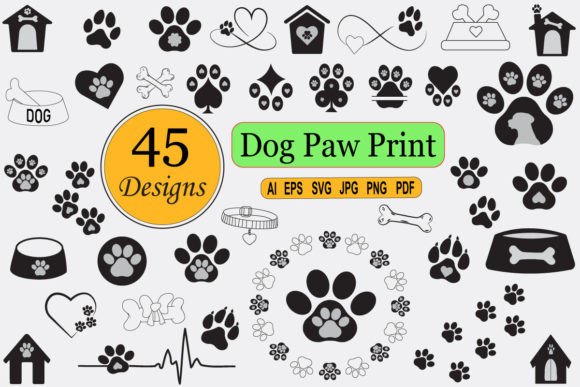
The Dog Paw Print Clip-Art Bundle Collection is a purpose-built digital asset toolkit designed for creators who need clean, scalable, and production-ready line art—specifically dog paw prints—in multiple formats. It’s not just decorative filler; it’s a functional design component that integrates directly into real-world creative workflows, from print-on-demand product development to educational resource creation and marketing material production. Its value lies in how seamlessly it slots into existing processes—not as an afterthought, but as a consistent, reliable element you plan with from the start.
How This Bundle Fits Into Your Creative Workflow
Think of the Dog Paw Print Clip-Art Bundle Collection as a modular building block—not a standalone decoration. Before launching a project like a KDP coloring book or a pet-themed apparel line, designers often spend hours sourcing, editing, or redrawing basic motifs. This bundle eliminates that friction. Because all 45 designs are delivered in AI, SVG, EPS, PDF, JPG, PNG, and EPS10 formats, you’re not choosing between vector precision and web-ready convenience—you’re getting both, simultaneously.
For example: if you’re designing a set of printable pet-themed planner stickers, you’ll likely begin with layout in Canva or Illustrator. The SVG files drop in cleanly, scale without distortion, and retain editable paths. If you later need to export individual elements for a Shopify product mockup, the PNGs at 300 ppi with transparent backgrounds go straight into Photoshop or Figma—no background removal, no quality loss, no re-tracing.
Compatibility That Saves Time, Not Creates Headaches
One of the most practical advantages of this collection is its cross-platform readiness. You don’t need Adobe Illustrator to use it—but if you do have it, the AI and EPS10 files let you ungroup, recolor, resize, and recombine paw prints into custom patterns or borders. No layer-locking surprises. No missing fonts or broken links. Each file is self-contained and production-safe.
For users working primarily in non-Adobe tools—like Cricut Design Space, Silhouette Studio, or even Google Slides—the SVG and PDF versions behave predictably. The JPG and PNG files serve immediate needs: social media posts, blog headers, or quick email newsletter graphics where speed matters more than editability. And because every format is included for each of the 45 unique paw print variations, you never hit a “format wall” mid-project.
Real-World Use Cases, Not Just Possibilities
- KDP Interior & Cover Design: When building an evergreen coloring book—say, a realistic dog breeds series—the paw prints become consistent visual anchors across pages. Use them as section dividers, corner flourishes, or frame elements. Because they’re line art, they align naturally with coloring page aesthetics and require zero contrast adjustment.
- Print-on-Demand (POD) Product Development: Whether you're creating cozy sweatshirts, ceramic mugs, or linen pillow covers, the high-res PNGs and vector files ensure crisp reproduction at any size. A small paw print on a baby onesie stays sharp; the same design scaled large on a tote bag retains clean edges—no pixelation, no jagged lines.
- Educational & Therapeutic Resources: Teachers and therapists use these prints in sensory worksheets, fine motor tracing exercises, or emotion-based activity cards (e.g., “place a paw print next to the feeling you’re having today”). The simplicity of line art supports focus and reduces visual clutter—especially important for neurodivergent learners.
- Marketing & Branding Consistency: Small business owners running pet grooming salons, dog-walking services, or rescue nonprofits can apply the same paw motif across flyers, banners, email headers, and social bios. Using the same source files ensures tonal consistency—no accidental mismatched line weights or proportions across platforms.
Organization and Efficiency: Built-In, Not Bolted On
The bundle is structured for immediate usability—not theoretical flexibility. Each of the 45 paw prints is delivered as an individual file in every supported format. That means no hunting through layered AI files to isolate one element. No renaming or sorting required before import. If your workflow depends on naming conventions (e.g., “paw_small_left”, “paw_dotted_outline”), you can rename them once and reuse the system across projects—without breaking links or losing context.
This level of organization also supports version control. If you update a design for a client and need to revert, you’re not digging through composite PSDs—you’re pulling from the original, untouched source file. That’s quality control built into the asset itself.
Long-Term Use: Why This Bundle Ages Well
Digital assets lose value when they’re tied to outdated software, restrictive licenses, or inconsistent output. The Dog Paw Print Clip-Art Bundle Collection avoids those pitfalls. Vector formats (AI, EPS, SVG) remain editable for years—even as software updates. PNGs at 300 ppi meet current print standards and will continue to do so. And because the illustrations are line art—not photorealistic or trend-dependent—they stay relevant across seasons and markets.
You’ll find these paw prints working just as effectively in a 2025 adult coloring book as they did in a 2022 kid’s t-shirt design. Their simplicity makes them adaptable, not disposable. That’s efficiency measured in months of saved labor—not minutes of faster downloads.
Practical Implementation Tips
- Start with your output first: Decide whether your end use is print, web, or cut-file (e.g., for vinyl). Then pull the matching format—SVG for cutting machines, PNG for social posts, AI for full editorial control.
- Batch-process when scaling: If you’re generating multiple color variants for a merch line, use Illustrator’s “Recolor Artwork” tool on the AI files—no manual swatch replacement needed.
- Use transparency intentionally: The PNGs include transparent backgrounds, but don’t assume automatic blending. Test them over your intended base color or texture—especially for mug or fabric mockups where background interaction affects perceived contrast.
- Archive by project, not by format: Rather than keeping separate “SVG” and “PNG” folders, store all versions inside a dated project folder (e.g., “KDP_DogColoring_2024_Q3”). That preserves context and simplifies future audits or resales.
- Leverage the variety, not just the quantity: The 45 distinct paw prints differ in orientation, line weight, and detail level—not just size. Use subtle variations to imply motion (e.g., staggered prints for a “walking” effect) or hierarchy (bolder prints as section headers, finer ones as footnotes).
Ultimately, the Dog Paw Print Clip-Art Bundle Collection works best when treated as infrastructure—not decoration. It’s the kind of resource you download once, organize once, and then forget you installed—because it simply shows up, reliably, exactly when needed. That’s not convenience. It’s workflow hygiene.