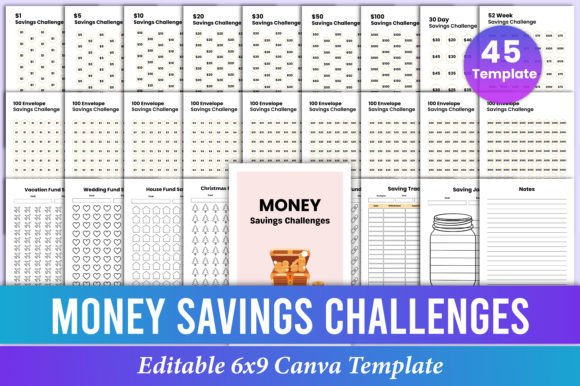
Money Savings Challenge Bundle Canva
Staying consistent with saving money is hard—not because people don’t care, but because motivation fades when tools aren’t flexible, visually clear, or easy to personalize. That’s where the Money Savings Challenge Bundle Canva stands out: it’s not just another printable PDF—it’s a fully editable, design-forward toolkit built for real-life use. Whether you're tracking daily habits, launching a financial wellness workshop, or creating branded content for your coaching business, this bundle gives you control over every detail—text, colors, fonts, layout—without needing design experience.
Why “Editable on Canva” Matters More Than You Think
Many buyers assume “editable” means they can change a few words—and stop there. But true editability goes deeper. With this Editable Money Savings Challenges Bundle Canva Template, you’re not limited to swapping labels. You can resize grids, adjust spacing for better readability, reposition challenge trackers to match your workflow, and even adapt layouts for different audiences—say, simplifying the 100 Envelope Savings Challenge for teens or adding motivational quotes to the 52 Week Savings Challenge Save 5000 version for adult learners.
A common mistake? Downloading a template, making one quick edit, then printing it—only to realize later that the font doesn’t scale well at 6×9 inches, or that the color contrast makes handwritten entries hard to read. That’s why checking the print-ready PDF quality before finalizing matters. This bundle delivers high-resolution, CMYK-optimized 6×9 inch files—tested for home printers, office copiers, and KDP uploads—so what you see in Canva matches what lands on paper.
Mistakes That Undermine Real Progress
Assuming all savings challenges are equally practical. Not every challenge fits every lifestyle. A freelancer with irregular income may struggle with the rigid 30 Day Savings Challenge Save 1000, while someone building emergency funds might benefit more from the 100 Envelope Savings Challenge Save 5,050—which builds discipline through physical interaction. The bundle includes both, but success depends on choosing *and customizing* the right one—not defaulting to the flashiest title.
Overlooking layout logic. Some users paste their own goals into pre-built tables without adjusting column width or row height. Result? Numbers overlap, dates run off the page, or checkboxes vanish when printed. Before sharing or printing, test each sheet at actual size. In Canva, use the “Resize” tool to preview how your edits hold up in 6×9 format—and adjust grid lines or margins accordingly.
Treating templates as static assets. This bundle isn’t meant to sit unchanged on your desktop. It’s designed to evolve with your goals. For example, if you start with the 25 Dollar Savings Challenge Save 1500 but earn a bonus mid-month, you can duplicate the page in Canva, rename it “+Bonus Track,” and add a new column for windfall allocations—no extra cost, no redesign needed.
What to Check Before You Customize—or Share
Before personalizing your Editable Canva Link, ask yourself three things:
- Who is using this? If it’s for clients or students, simplify language—swap “bi-weekly” for “every two weeks,” avoid jargon like “compound interest” unless explained, and ensure checkboxes or progress bars are large enough for varied motor skills.
- Where will it live? For digital use (e.g., shared Google Drive folders), keep file sizes lean by exporting as PDF/A instead of standard PDF. For Amazon KDP, confirm bleed settings are disabled—this bundle’s interior pages are optimized for KDP’s 6×9 trim with no bleed required.
- How will progress be recorded? Handwritten? Typed? Scanned? If users plan to write by hand, increase line spacing in text fields and leave generous margins—especially around the 30 Dollar Savings Challenge Save 1800 tracker, where weekly totals stack quickly.
Better Choices Start With Intentional Editing
Instead of editing randomly, start with purpose. Want to build consistency? Focus first on the 30 Day Savings Challenge Save 300—it’s short, low-pressure, and builds momentum. Use Canva’s “Brand Kit” to lock in your primary color and two supporting fonts, so every challenge feels like part of the same system—not a collection of unrelated printables.
Rather than copying generic dollar amounts, customize targets to reflect real priorities. Change “Save $60” in the 1 Dollar Savings Challenge Save 60 to “Save $60 for car maintenance” or “Save $60 toward library membership.” Small shifts like these turn abstract numbers into meaningful actions—and make the tracker feel personally relevant.
And don’t skip the cover page. It’s often the first impression—whether you’re handing it to a client, posting it on Instagram, or uploading to KDP. Use Canva’s background remover to add a subtle photo of coins, a cozy notebook, or even your logo—then update the title font to something warm and approachable (not overly decorative) so it reads clearly at thumbnail size.
Realistic Expectations, Real Results
This Money Savings Challenge Bundle Canva won’t magically fix overspending—but it *will* remove friction between intention and action. It gives educators clean handouts for financial literacy classes, freelancers a professional-looking tracker to share with accountability partners, and small business owners a ready-to-brand asset for email newsletters or lead magnets.
The difference between average results and lasting change isn’t the challenge itself—it’s how well the tool fits *your* rhythm, audience, and environment. That’s why every page—from the 26 Week Savings Challenge Save 702 to the 5000 Dollar Savings Challenge Save 5000—is built to be adjusted, not accepted as-is.
If you’ve tried savings challenges before and stalled, the issue likely wasn’t your commitment—it was the tool’s rigidity. With full Canva editability, print-ready precision, and thoughtful structure across 20+ formats, this bundle supports growth, not guilt. You’re not just buying templates. You’re investing in clarity, flexibility, and the quiet confidence that comes from knowing your next step is already designed—ready for you to make it your own.